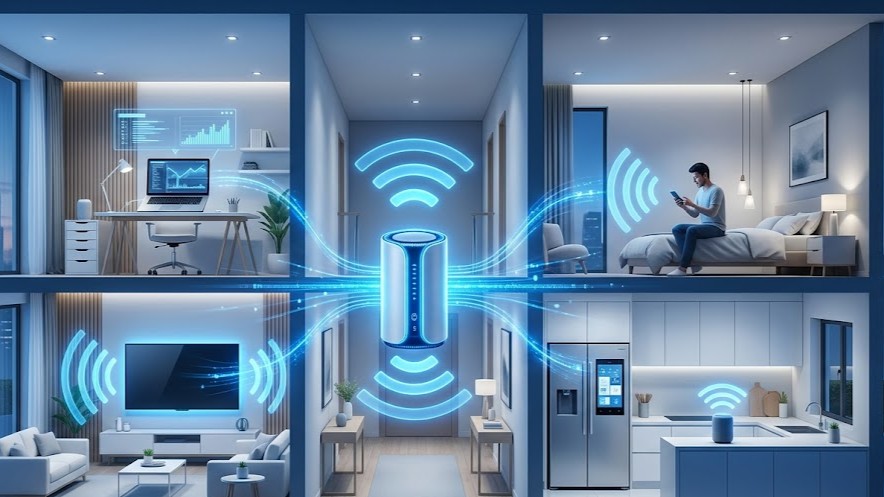
How Wi-Fi Works — The Invisible Internet You Use Every Day
Have you ever stopped and wondered how Wi-Fi works?
You open Instagram, watch YouTube, or send a WhatsApp message — and somehow your phone connects to the internet without a single wire.
It feels normal now, but when you really think about it, wireless internet is one of the most fascinating technologies in modern life.
Your router sends invisible signals through walls, furniture, and rooms… directly to your phone, laptop, or smart TV.
So how does Wi-Fi actually work?
Let’s break it down in the simplest way possible.
What Is Wi-Fi?
Wi-Fi is a wireless technology that allows devices to connect to the internet using radio waves instead of physical cables.
Instead of Ethernet wires, Wi-Fi sends data through the air between:
- Your router
- Your smartphone
- Your laptop
- Smart TVs
- IoT devices
In simple terms:
Router → Radio Waves → Your Device → Internet
That’s the foundation of how wireless internet works.
How Wi-Fi Signals Travel
Your Wi-Fi router constantly sends and receives data using radio frequencies.
Common Wi-Fi bands:
- 2.4 GHz
- 5 GHz
- 6 GHz (Wi-Fi 6E / Wi-Fi 7)
These frequencies carry information through electromagnetic waves.
Think of your router like this:
It’s basically a mini broadcasting station inside your house.
It sends internet signals outward, and your devices listen, decode, and use that information.
How Wi-Fi Works Step by Step
Step 1: Internet enters your router
Your ISP (Internet Service Provider) delivers internet to your modem/router.
Step 2: Router converts data into wireless signals
This is where your router creates Wi-Fi signals.
Step 3: Signals travel through air
These radio waves spread around your home.
Step 4: Your phone or laptop receives signals
Built-in antennas detect those signals.
Step 5: Device decodes the information
Your phone turns those radio waves into websites, videos, or messages.
This all happens in milliseconds.
How Wi-Fi Works Through Walls
One of the most searched questions is: How does Wi-Fi go through walls?
Wi-Fi uses radio waves, and radio waves can pass through many materials.
Wi-Fi passes relatively well through:
- Wood
- Glass
- Drywall
Wi-Fi struggles with:
- Concrete
- Metal
- Thick stone walls
Important hidden fact:
Water absorbs Wi-Fi signals, which means bathrooms, water tanks, and even large human crowds can weaken wireless internet.
2.4 GHz vs 5 GHz Wi-Fi — What’s Better?
2.4 GHz:
- Better range
- Stronger through walls
- Slower speed
- More interference
5 GHz:
- Faster internet
- Better for gaming and streaming
- Lower range
- Weaker through obstacles
Quick answer:
2.4 GHz = Coverage
5 GHz = Speed
Why Your Wi-Fi Speed Changes
If your Wi-Fi is sometimes fast and sometimes slow, several factors may be affecting it:
Common causes:
- Distance from router
- Wall thickness
- Router placement
- Too many connected devices
- Neighboring Wi-Fi interference
- Microwave ovens or Bluetooth devices
Key truth:
Strong signal bars do not always mean fast internet.
What Does a Router Actually Do?
Your router is more than a signal box.
It:
- Receives internet
- Converts data to wireless signals
- Connects multiple devices
- Secures your network
- Manages traffic
Simple analogy:
Your router is like a traffic controller for your digital world.
Best Router Placement for Better Wi-Fi
If you want to improve Wi-Fi speed, router placement matters a lot.
Best places:
- Center of your home
- Elevated shelf
- Open room
Worst places:
- Behind TV
- Inside cabinet
- Near microwave
- House corners
Pro tip:
Moving your router can improve performance more than upgrading your internet plan in some cases.
Is Wi-Fi Safe?
Wi-Fi uses non-ionizing radiation, which means it does not have enough energy to damage cells like X-rays or gamma rays.
Wi-Fi is designed for wireless communication, not harmful radiation.
Internal Links You May Also Like
- What is Electricity? A Beginner’s Guide
- Understanding Resistors — The Traffic Police of Electronics
- How Capacitors Store and Release Energy
- Inside a Smartphone — How Billions of Transistors Fit in Your Pocket
Final Thoughts — How Wi-Fi Really Works
Now you know how Wi-Fi works:
Your router converts internet into radio waves, sends them wirelessly through your home, and your devices receive and decode those signals instantly.
So every time you stream, scroll, or game online, your phone is pulling invisible data from the air around you.
That’s not magic.
That’s radio physics, communication engineering, and wireless technology working together every second.
Frequently Asked Questions (FAQ)
1. How does Wi-Fi actually work?
Wi-Fi works by converting internet data into radio waves, transmitting them wirelessly through a router, and allowing devices like phones and laptops to receive and decode those signals.
2. Can Wi-Fi pass through walls?
Yes, Wi-Fi can pass through walls, especially wood and drywall, but materials like concrete, metal, and thick stone weaken the signal.
3. Which is better: 2.4 GHz or 5 GHz?
2.4 GHz is better for longer range, while 5 GHz offers faster speeds over shorter distances.
4. Why is my Wi-Fi signal strong but internet slow?
Strong signal only means connection to router is good. Slow speed can still happen due to ISP limits, congestion, interference, or too many connected devices.
5. Does router placement really matter?
Yes. Central, open, elevated router placement can significantly improve wireless internet coverage and speed.
Share this article